Overview
The API accepts JSON requests and analyzes the primary face in an image. Every successful response includes api_version; every failure uses the same structured error envelope.
Base URL: https://api.rate-my-photo.com. Contact sales before production use to discuss access and pricing.
Send your API token as Authorization: Bearer <token> and use Content-Type: application/json. The examples read the token from an API_TOKEN environment variable.
| Method | Path | Purpose | Credit cost |
|---|---|---|---|
POST |
/attractiveness |
Score the attractiveness of the primary face; optionally return a boundary box, face crop, and gender. | 3 credits |
POST |
/age |
Estimate age; optionally return a boundary box, face crop, and face mesh. | 3 credits |
POST |
/facemesh |
Return facial keypoints; optionally return frontalized keypoints and pose. | 2 credits |
Image input
Every analysis endpoint requires exactly one of the following request fields:
| Field | Type | Description |
|---|---|---|
face_image |
string | Raw base64 or a data:image/...;base64, data URI. |
face_image_url |
string | A public HTTP or HTTPS image URL. Private, loopback, link-local, and unreachable targets are refused. |
Limits and preprocessing
- Decoded image size must not exceed 15 MB.
- Neither image dimension may exceed 4500 px.
- If the longest side is above 1000 px, the image is downscaled to a maximum side of 1000 px with aspect ratio preserved.
- Response coordinates use the processed image dimensions, so retain those dimensions when drawing a returned boundary box.
Attractiveness scoring
Scores the primary face in the supplied image on a 0–10 scale and returns both the raw model score and a calibrated score intended for presentation.
Each successful Attractiveness API request consumes 3 credits.
Basic request
#!/usr/bin/env bash
set -euo pipefail
: "${API_TOKEN:?Set the API_TOKEN environment variable}"

curl -sS --fail-with-body https://api.rate-my-photo.com/attractiveness \
  -H "Authorization: Bearer $API_TOKEN" \
  -H "Content-Type: application/json" \
  -d '{
    "face_image_url": "https://howolddoyoulook.com/static/images/sample/portrait_example_male.jpg",
    "return_boundary_box": true,
    "return_face_base64": false,
    "return_gender": true
  }'
#!/usr/bin/env python3
import os
import requests
response = requests.post(
"https://api.rate-my-photo.com/attractiveness",
headers={"Authorization": f"Bearer {os.environ['API_TOKEN']}"},
json={
"face_image_url": "https://howolddoyoulook.com/static/images/sample/portrait_example_male.jpg",
"return_boundary_box": True,
"return_face_base64": False,
"return_gender": True,
},
timeout=60,
)
response.raise_for_status()
print(response.json())#!/usr/bin/env node
const token = process.env.API_TOKEN;
if (!token) throw new Error("Set the API_TOKEN environment variable");
async function main() {
const response = await fetch("https://api.rate-my-photo.com/attractiveness", {
method: "POST",
headers: {
Authorization: `Bearer ${token}`,
"Content-Type": "application/json",
},
body: JSON.stringify({
face_image_url:
"https://howolddoyoulook.com/static/images/sample/portrait_example_male.jpg",
return_boundary_box: true,
return_face_base64: false,
return_gender: true,
}),
});
if (!response.ok) throw new Error(`${response.status}: ${await response.text()}`);
console.log(JSON.stringify(await response.json(), null, 2));
}
main();Request parameters
In addition to one image source, the endpoint accepts these optional output controls:
| Parameter | Type | Default | Effect |
|---|---|---|---|
return_boundary_box |
boolean | true |
Include x, y, width, and height for the analyzed face. |
return_face_base64 |
boolean | false |
Include a base64-encoded JPEG crop of the analyzed face. |
return_gender |
boolean | false |
Include the detected gender as male, female, or an empty string when unavailable. |
Response schema
Fields marked conditional appear only when their corresponding request parameter is enabled.
| Field | Type | Presence | Description |
|---|---|---|---|
api_version |
string | Always | The effective API version used for the request. |
score |
number | Always | The raw model score from 0 to 10. |
score_adjusted |
number | Always | The calibrated score, normalized to a 3.5–10 distribution. It averages approximately 0.5 points higher than the raw score and is recommended for presentation and most integrations. |
boundary_box |
object | Conditional | Face position as pixel values x, y, width, and height. Returned when return_boundary_box is true. |
face_base64 |
string | Conditional | Base64-encoded JPEG crop of the analyzed face. Returned when return_face_base64 is true. |
gender |
string | Conditional | male, female, or an empty string. Returned when return_gender is true. |
The endpoint exposes only the documented scoring and optional face fields. Internal model metadata is not returned, and age-estimation or landmark controls are not accepted.
Example response
{
  "api_version": "1.1",
  "score": 7.42,
  "score_adjusted": 8.11,
  "boundary_box": {
    "x": 113,
    "y": 89,
    "width": 142,
    "height": 180
  },
  "gender": "male"
}
Save the returned face
For most integrations, we recommend leaving return_boundary_box enabled and cropping the face client-side using the returned x, y, width, and height values. This avoids transferring a larger Base64 payload and gives you control over crop padding, size, and image quality. The coordinates use the processed image dimensions described under Image input.
If you prefer a ready-made crop, set return_face_base64 to true. The response then includes face_base64, a Base64-encoded JPEG that you can decode and save as shown below.
import base64
from pathlib import Path

data = response.json()  # response from POST /attractiveness with "return_face_base64": true
OUTPUT_PATH = Path("attractiveness_face.jpg")
face_base64 = data.get("face_base64")
if face_base64:
    OUTPUT_PATH.write_bytes(base64.b64decode(face_base64))
    print(f"Saved face image to: {OUTPUT_PATH.resolve()}")
else:
    print("No face_base64 in response.")
face_base64 value.Age estimation
Estimates the apparent age of the primary face.
Each successful Age API request consumes 3 credits.
Basic request
#!/usr/bin/env bash
set -euo pipefail
: "${API_TOKEN:?Set the API_TOKEN environment variable}"

curl -sS --fail-with-body https://api.rate-my-photo.com/age \
  -H "Authorization: Bearer $API_TOKEN" \
  -H "Content-Type: application/json" \
  -d '{
    "face_image_url": "https://howolddoyoulook.com/static/images/sample/portrait_example_male.jpg",
    "return_boundary_box": true,
    "return_face_base64": false,
    "return_facemesh": false
  }'
#!/usr/bin/env python3
import os
import requests
response = requests.post(
"https://api.rate-my-photo.com/age",
headers={"Authorization": f"Bearer {os.environ['API_TOKEN']}"},
json={
"face_image_url": "https://howolddoyoulook.com/static/images/sample/portrait_example_male.jpg",
"return_boundary_box": True,
"return_face_base64": False,
"return_facemesh": False,
},
timeout=60,
)
response.raise_for_status()
print(response.json())#!/usr/bin/env node
const token = process.env.API_TOKEN;
if (!token) throw new Error("Set the API_TOKEN environment variable");
async function main() {
const response = await fetch("https://api.rate-my-photo.com/age", {
method: "POST",
headers: {
Authorization: `Bearer ${token}`,
"Content-Type": "application/json",
},
body: JSON.stringify({
face_image_url:
"https://howolddoyoulook.com/static/images/sample/portrait_example_male.jpg",
return_boundary_box: true,
return_face_base64: false,
return_facemesh: false,
}),
});
if (!response.ok) throw new Error(`${response.status}: ${await response.text()}`);
console.log(JSON.stringify(await response.json(), null, 2));
}
main();Request parameters
In addition to one image source, the endpoint accepts these optional controls:
| Parameter | Type | Default | Effect |
|---|---|---|---|
return_boundary_box |
boolean | true |
Include x, y, width, and height. |
return_face_base64 |
boolean | false |
Include a base64-encoded crop of the detected face. |
Response schema
Fields marked conditional appear only when their corresponding request parameter is enabled.
| Field | Type | Presence | Description |
|---|---|---|---|
api_version |
string | Always | The effective API version used for the request. |
age |
number | Always | Estimated apparent age in years. |
boundary_box |
object | Conditional | Face position as pixel values x, y, width, and height. Returned when return_boundary_box is true. |
face_base64 |
string | Conditional | Base64-encoded JPEG crop of the detected face. Returned when return_face_base64 is true. |
facemesh |
object | Conditional | Nested face mesh result using the schema documented below. Returned when return_facemesh is true. |
The boundary box uses the coordinate space of the processed image described under Image input.
Example response
{
  "api_version": "1.1",
  "age": 25.42,
  "boundary_box": {
    "x": 113,
    "y": 89,
    "width": 142,
    "height": 180
  }
}
Save the returned face
Set return_face_base64 to true and the response includes face_base64, a Base64-encoded JPEG crop of the detected face. Decode that string and write it to disk, as shown below. Alternatively, leave return_boundary_box enabled and crop the face yourself from the original image using the returned coordinates.
import base64
from pathlib import Path

data = response.json()  # response from POST /age with "return_face_base64": true
OUTPUT_PATH = Path("age_face.jpg")
face_base64 = data.get("face_base64")
if face_base64:
    OUTPUT_PATH.write_bytes(base64.b64decode(face_base64))
    print(f"Saved face image to: {OUTPUT_PATH.resolve()}")
else:
print("No face_base64 in response.")face_base64 crop written to age_face.jpg.Face mesh
Returns 478 normalized three-dimensional landmarks in a MediaPipe-compatible face-mesh format for the primary face.
Each successful Facemesh API request consumes 2 credits.
Basic request
#!/usr/bin/env bash
set -euo pipefail
: "${API_TOKEN:?Set the API_TOKEN environment variable}"

curl -sS --fail-with-body https://api.rate-my-photo.com/facemesh \
  -H "Authorization: Bearer $API_TOKEN" \
  -H "Content-Type: application/json" \
  -d '{
    "face_image_url": "https://howolddoyoulook.com/static/images/sample/portrait_example_male.jpg",
    "return_keypoints": true,
    "return_frontalized_keypoints": true,
    "return_pose": true
  }'
#!/usr/bin/env python3
import os
import requests
response = requests.post(
"https://api.rate-my-photo.com/facemesh",
headers={"Authorization": f"Bearer {os.environ['API_TOKEN']}"},
json={
"face_image_url": "https://howolddoyoulook.com/static/images/sample/portrait_example_male.jpg",
"return_keypoints": True,
"return_frontalized_keypoints": True,
"return_pose": True,
},
timeout=60,
)
response.raise_for_status()
print(response.json())#!/usr/bin/env node
const token = process.env.API_TOKEN;
if (!token) throw new Error("Set the API_TOKEN environment variable");
async function main() {
const response = await fetch("https://api.rate-my-photo.com/facemesh", {
method: "POST",
headers: {
Authorization: `Bearer ${token}`,
"Content-Type": "application/json",
},
body: JSON.stringify({
face_image_url:
"https://howolddoyoulook.com/static/images/sample/portrait_example_male.jpg",
return_keypoints: true,
return_frontalized_keypoints: true,
return_pose: true,
}),
});
if (!response.ok) throw new Error(`${response.status}: ${await response.text()}`);
console.log(JSON.stringify(await response.json(), null, 2));
}
main();Request parameters
In addition to one image source, the endpoint accepts these optional output controls:
| Parameter | Type | Default | Effect |
|---|---|---|---|
return_keypoints |
boolean | true |
Include the 478 x, y, and z keypoints. |
return_frontalized_keypoints |
boolean | false |
Include 478 frontalized keypoints. |
return_pose |
boolean | false |
Include head-pose measurements such as yaw, pitch, and roll. |
Response schema
All optional fields are controlled independently by the request parameters above.
| Field | Type | Presence | Description |
|---|---|---|---|
api_version |
string | Always | The effective API version used for the request. |
keypoints |
array<object> | Conditional | 478 normalized landmarks. Each item contains numeric x, y, and z values. Returned when return_keypoints is true. |
frontalized_keypoints |
array<object> | Conditional | 478 pose-corrected landmarks with numeric x, y, and z values. Returned when return_frontalized_keypoints is true. |
pose |
object | Conditional | Head-pose measurements: yaw, pitch, roll, off_frontal_deg, and frontal_deviation. Returned when return_pose is true. |
Example response
{
  "api_version": "1.1",
  "keypoints": [
    { "x": 0.47999, "y": 0.58708, "z": -0.04268 }
  ],
  "frontalized_keypoints": [
    { "x": 0.48012, "y": 0.58191, "z": -0.03924 }
  ],
  "pose": {
    "yaw": 1.2,
    "pitch": -2.4,
    "roll": 0.8,
    "off_frontal_deg": 2.8,
    "frontal_deviation": 0.03
  }
}
The arrays are abbreviated for readability. A full keypoint response contains 478 entries. This endpoint does not return a boundary box.
Visualize the face mesh
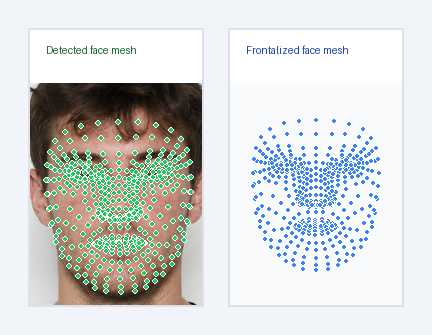
This short Python example calls POST /age, crops the face with the returned boundary box, draws the 478 keypoints on it, and compares that with the frontalized_keypoints side by side. Keypoints are normalized to the full image (0..1); frontalized keypoints are returned in a centered, pose-corrected space, so they are simply scaled to fit their panel.
Requires pip install requests pillow. Save a portrait as c.jpg next to the script.
Python example
import base64
            import json
            import os
            from pathlib import Path

            import requests
            from PIL import Image, ImageDraw, ImageFont, ImageOps

            API_URL = "https://api.rate-my-photo.com/age"
            IMAGE_PATH = Path("api-examples/demo-photos/img2.png")
            OUTPUT_PATH = Path("facemesh_comparison.png")


            def get_font(size):
                return ImageFont.load_default()


            def draw_points(image, points, color):
                draw = ImageDraw.Draw(image)
                radius = max(1.5, min(image.size) / 300)
                for x, y in points:
                    draw.ellipse((x - radius - 1, y - radius - 1, x + radius + 1, y + radius + 1), fill="white")
                    draw.ellipse((x - radius, y - radius, x + radius, y + radius), fill=color)


            def add_title(image, title, color):
                panel = Image.new("RGB", (image.width, image.height + 55), "white")
                panel.paste(image, (0, 55))
                draw = ImageDraw.Draw(panel)
                draw.text((18, 16), title, fill=color, font=get_font(19))
                draw.rectangle((0, 0, panel.width - 1, panel.height - 1), outline="#dce1e8", width=2)
                return panel


            token = os.getenv("API_TOKEN")
            if not token:
                raise RuntimeError("Set the API_TOKEN environment variable.")
            if not IMAGE_PATH.exists():
                raise FileNotFoundError(f"Image not found: {IMAGE_PATH}")

            image = ImageOps.exif_transpose(Image.open(IMAGE_PATH)).convert("RGB")
            width, height = image.size
            encoded = base64.b64encode(IMAGE_PATH.read_bytes()).decode()

            response = requests.post(API_URL, headers={
                "Authorization": f"Bearer {token}",
                "X-API-Version": "1.1",
            }, json={
                "face_image": encoded,
                "return_boundary_box": True,
                "return_facemesh": True,
                "return_frontalized_keypoints": True,
            }, timeout=60)

            print(f"Status code: {response.status_code}")
            try:
                data = response.json()
                print(json.dumps(data, indent=2))
            except requests.JSONDecodeError:
                print(response.text)
                raise RuntimeError("API returned invalid JSON.")

            response.raise_for_status()

            box = data["boundary_box"]
            keypoints = data["facemesh"]["keypoints"]
            frontalized = data["facemesh"]["frontalized_keypoints"]

            padding_x, padding_y = box["width"] * 0.12, box["height"] * 0.12
            left = max(0, round(box["x"] - padding_x))
            top = max(0, round(box["y"] - padding_y))
            right = min(width, round(box["x"] + box["width"] + padding_x))
            bottom = min(height, round(box["y"] + box["height"] + padding_y))

            face = image.crop((left, top, right, bottom))
            draw_points(face, [(p["x"] * width - left, p["y"] * height - top) for p in keypoints], "#22c55e")

            xs, ys = [p["x"] for p in frontalized], [p["y"] for p in frontalized]
            min_x, max_x, min_y, max_y = min(xs), max(xs), min(ys), max(ys)
            mesh_width, mesh_height = max_x - min_x, max_y - min_y
            pad = max(25, round(min(face.size) * 0.1))
            scale = min((face.width - 2 * pad) / mesh_width, (face.height - 2 * pad) / mesh_height)
            offset_x = (face.width - mesh_width * scale) / 2
            offset_y = (face.height - mesh_height * scale) / 2

            front = Image.new("RGB", face.size, "#f8fafc")
            draw_points(front, [
                (offset_x + (p["x"] - min_x) * scale, offset_y + (p["y"] - min_y) * scale)
                for p in frontalized
            ], "#3b82f6")

            face = add_title(face, "Detected face mesh", "#166534")
            front = add_title(front, "Frontalized face mesh", "#1e40af")

            gap, margin = 24, 28
            canvas = Image.new("RGB", (face.width + front.width + gap + margin * 2, face.height + margin * 2), "#f1f5f9")
            canvas.paste(face, (margin, margin))
            canvas.paste(front, (margin + face.width + gap, margin))
            canvas.save(OUTPUT_PATH, quality=95)

            print(f"Saved result to: {OUTPUT_PATH.resolve()}")
Result
Left: the cropped face with the original mesh. Right: the same face mesh frontalized to a straight-on view.
Error handling
Errors use an HTTP status appropriate to the failure and a stable machine-readable code.
{
  "api_version": "1.1",
  "error": {
    "code": "NO_FACE_DETECTED",
    "message": "No face was detected in the supplied image."
  }
}| Status | Code | Meaning |
|---|---|---|
| 400 | VALIDATION_ERROR |
Missing or conflicting image sources, invalid fields, or an invalid URL. |
| 400 | UNSUPPORTED_VERSION |
The requested API version is not supported. |
| 413 | IMAGE_TOO_LARGE |
The decoded image exceeds 15 MB. |
| 413 | IMAGE_DIMENSIONS_TOO_LARGE |
An image side exceeds 4500 px. |
| 422 | INVALID_IMAGE |
The image or base64 data cannot be decoded. |
| 422 | NO_FACE_DETECTED |
No usable face was found. |
| 422 | IMAGE_URL_UNREACHABLE |
The URL failed or resolved to a refused address. |
| 502 | UPSTREAM_ERROR |
An analysis service returned an unexpected response. |
| 504 | UPSTREAM_TIMEOUT |
An analysis service did not respond in time. |
| 500 | INTERNAL_ERROR |
An unexpected server error occurred. |
Versioning
Set the optional X-API-Version request header. If the header is omitted, the API defaults to version 1.1. The effective version is echoed in the response header and JSON body.
X-API-Version: 1.1An unsupported value returns HTTP 400 with error code UNSUPPORTED_VERSION.
Planning a production integration?
Tell us about your use case, expected traffic, and required response fields.